
Morse Code Tree | Encoding & Decoding Using a Binary Tree
Are you looking to understand or process the Morse code pattern elegantly or efficiently, but don’t know how? The Morse binary tree can be a fruitful idea. This tree is like a visual map, with branches represented by dots and dashes. I know how difficult it is to make a Morse decoder using programming code, especially when you don’t see the concept of binary trees, as it can produce decoding errors.
Now, no need to worry as you’re on the right article. In this article, we’ve explored all the nitty-gritty of the Morse code tree, and by the end of the article, you’ll be able to understand how the Morse code pattern is structured and how each letter is represented within the tree. We’ve not only guided you through the process of Morse code binary tree but also provided a complete Python code for encoding purposes. So, whether you’re a developer or an enthusiast looking to process Morse code elegantly, this guide is your cream of the crop.
What is Morse Code Binary Tree?
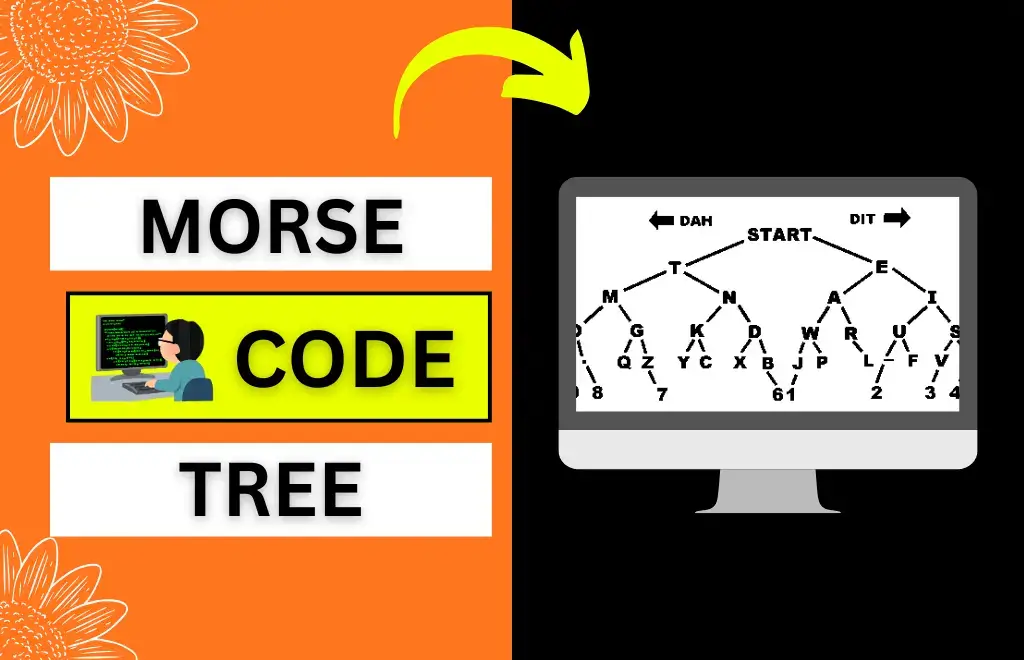
Before diving into the Morse code binary tree, first, understand the concept of a binary tree. A binary tree is a data structure used to organize data hierarchically and has at most two nodes: left and right. Just like a simple tree, it has multiple branches connected to the root node, each indicating the Morse code for each character.
A binary tree is used to encode and decode Morse code, with the root serving as the starting point: left branches denote a dot (.), and right branches denote a dash (-). It’s an elegant way to process and learn Morse code. However, you can also use our simple Morse code translator for easy encoding and decoding of a message.
- Root: Serving as a starting point
- Left Branch: Serving as Morse code dot (.)
- Right Branch: Serving as Morse code dash (-)
Morse Code Tree Chart and PDFs
We’ve provided a graph and all the necessary PDFs for the Morse code binary tree below, which you can use as a reference to understand Morse code uniquely:

Morse Code Encoder Using a Binary Tree
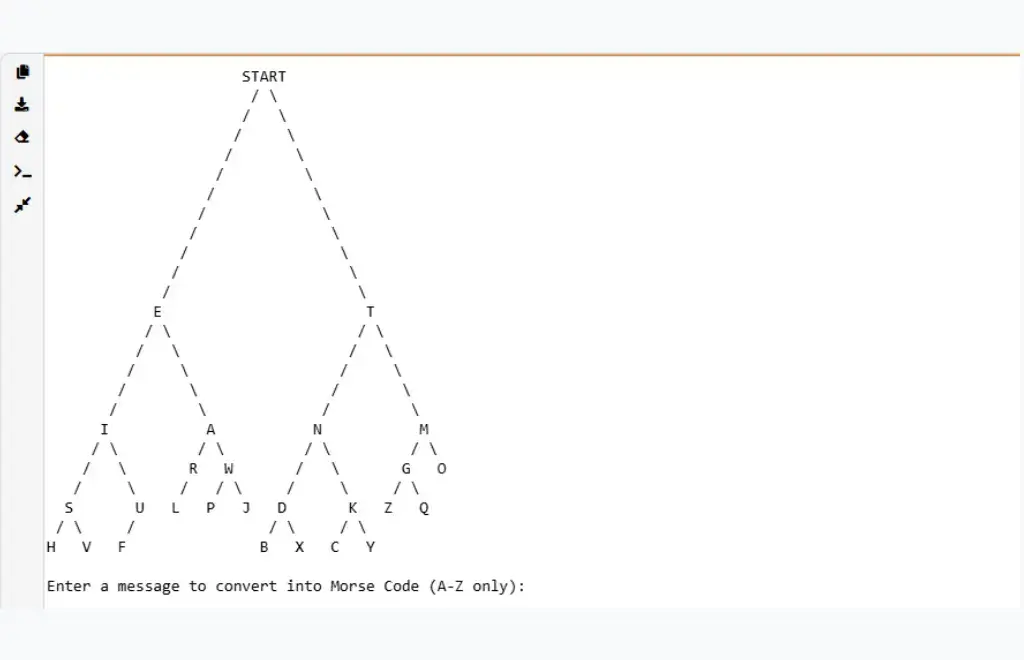
We’ve provided Python code below that uses a binary tree data structure to store Morse code. The code uses a tree to convert all 26 alphabetic characters to Morse code by traversing the tree to find each character in the message and convert it to its corresponding Morse code.
import sys
import re

# ========== ASCII TREE DRAWING CODE ==========
class AsciiNode(object):
    left = None
    right = None
    edge_length = 0
    height = 0
    lablen = 0
    parent_dir = 0
    label = ''

MAX_HEIGHT = 1000
lprofile = [0] * MAX_HEIGHT
rprofile = [0] * MAX_HEIGHT
INFINITY = (1 << 20)
gap = 3
print_next = 0

def build_ascii_tree_recursive(t):
    if t is None:
        return None
    node = AsciiNode()
    node.left = build_ascii_tree_recursive(t.left)
    node.right = build_ascii_tree_recursive(t.right)
    if node.left:
        node.left.parent_dir = -1
    if node.right:
        node.right.parent_dir = 1
    node.label = '{}'.format(t.value)
    node.lablen = len(node.label)
    return node

def build_ascii_tree(t):
    if t is None:
        return None
    node = build_ascii_tree_recursive(t)
    node.parent_dir = 0
    return node

def compute_lprofile(node, x, y):
    if node is None:
        return
    isleft = (node.parent_dir == -1)
    lprofile[y] = min(lprofile[y], x - ((node.lablen - isleft) // 2))
    if node.left:
        for i in range(1, node.edge_length + 1):
            if y + i < MAX_HEIGHT:
                lprofile[y + i] = min(lprofile[y + i], x - i)
    compute_lprofile(node.left, x - node.edge_length - 1, y + node.edge_length + 1)
    compute_lprofile(node.right, x + node.edge_length + 1, y + node.edge_length + 1)

def compute_rprofile(node, x, y):
    if node is None:
        return
    notleft = (node.parent_dir != -1)
    rprofile[y] = max(rprofile[y], x + ((node.lablen - notleft) // 2))
    if node.right:
        for i in range(1, node.edge_length + 1):
            if y + i < MAX_HEIGHT:
                rprofile[y + i] = max(rprofile[y + i], x + i)
    compute_rprofile(node.left, x - node.edge_length - 1, y + node.edge_length + 1)
    compute_rprofile(node.right, x + node.edge_length + 1, y + node.edge_length + 1)

def compute_edge_lengths(node):
    if node is None:
        return
    compute_edge_lengths(node.left)
    compute_edge_lengths(node.right)
    if node.right is None and node.left is None:
        node.edge_length = 0
    else:
        if node.left:
            for i in range(node.left.height):
                rprofile[i] = -INFINITY
            compute_rprofile(node.left, 0, 0)
            hmin = node.left.height
        else:
            hmin = 0
        if node.right:
            for i in range(node.right.height):
                lprofile[i] = INFINITY
            compute_lprofile(node.right, 0, 0)
            hmin = min(node.right.height, hmin)
        else:
            hmin = 0
        delta = 4
        for i in range(hmin):
            delta = max(delta, gap + 1 + rprofile[i] - lprofile[i])
        if (((node.left and node.left.height == 1) or (node.right and node.right.height == 1)) and delta > 4):
            delta -= 1
        node.edge_length = ((delta + 1) // 2) - 1
    h = 1
    if node.left:
        h = max(node.left.height + node.edge_length + 1, h)
    if node.right:
        h = max(node.right.height + node.edge_length + 1, h)
    node.height = h

def print_level(node, x, level):
    global print_next
    if node is None:
        return
    isleft = (node.parent_dir == -1)
    if level == 0:
        spaces = x - print_next - ((node.lablen - isleft) // 2)
        sys.stdout.write(' ' * spaces)
        print_next += spaces
        sys.stdout.write(node.label)
        print_next += node.lablen
    elif node.edge_length >= level:
        if node.left:
            spaces = x - print_next - level
            sys.stdout.write(' ' * spaces)
            print_next += spaces
            sys.stdout.write('/')
            print_next += 1
        if node.right:
            spaces = x - print_next + level
            sys.stdout.write(' ' * spaces)
            print_next += spaces
            sys.stdout.write('\\')
            print_next += 1
    else:
        print_level(node.left, x - node.edge_length - 1, level - node.edge_length - 1)
        print_level(node.right, x + node.edge_length + 1, level - node.edge_length - 1)

def drawTree(t):
    if t is None:
        return
    proot = build_ascii_tree(t)
    compute_edge_lengths(proot)
    for i in range(proot.height):
        lprofile[i] = INFINITY
    compute_lprofile(proot, 0, 0)
    xmin = min(lprofile[:proot.height])
    for i in range(proot.height):
        global print_next
        print_next = 0
        print_level(proot, -xmin, i)
        print('')
    if proot.height >= MAX_HEIGHT:
        print(f"This tree is taller than {MAX_HEIGHT}, and may be drawn incorrectly.")

# ========== MORSE CODE BINARY TREE ==========
class Node:
    def __init__(self, value, left=None, right=None):
        self.value = value
        self.left = left
        self.right = right

def getMorseCode(node, character, code):
    if node is None:
        return False
    elif node.value == character:
        return True
    else:
        if getMorseCode(node.left, character, code):
            code.insert(0, ".")
            return True
        elif getMorseCode(node.right, character, code):
            code.insert(0, "-")
            return True
    return False

# Build the Morse code binary tree
tree = Node("START")
tree.left = Node("E")
tree.right = Node("T")
tree.left.left = Node("I")
tree.left.right = Node("A")
tree.right.left = Node("N")
tree.right.right = Node("M")
tree.left.left.left = Node("S")
tree.left.left.right = Node("U")
tree.left.right.left = Node("R")
tree.left.right.right = Node("W")
tree.right.left.left = Node("D")
tree.right.left.right = Node("K")
tree.right.right.left = Node("G")
tree.right.right.right = Node("O")
tree.left.left.left.left = Node("H")
tree.left.left.left.right = Node("V")
tree.left.left.right.left = Node("F")
tree.left.right.left.left = Node("L")
tree.left.right.right.left = Node("P")
tree.left.right.right.right = Node("J")
tree.right.left.left.left = Node("B")
tree.right.left.left.right = Node("X")
tree.right.left.right.left = Node("C")
tree.right.left.right.right = Node("Y")
tree.right.right.left.left = Node("Z")
tree.right.right.left.right = Node("Q")

drawTree(tree)

message = input("\nEnter a message to convert into Morse Code (A-Z only): ").upper()
morseCode = ""

for character in message:
    if character == " ":
        morseCode += " / "
        continue
    dotsdashes = []
    if getMorseCode(tree, character, dotsdashes):
        morseCode += "".join(dotsdashes) + " "
    else:
        morseCode += "? "  # Unknown characters shown as ?

print("\nMorse Code:", morseCode)
Advantages of Morse Code Tree
Below are some of the advantages of using Morse code tree:
- Efficient: This method has been proven efficient and effective for finding the Morse code sequence, enabling rapid encoding and decoding.
- Visualization: The International Morse code binary tree allows users to understand the structure of different codes by providing a visual representation of Morse code.
- Applications: It’s used in a variety of applications, including data compression and telecommunications.
Using Java for Implementing Morse Code Using a Binary Tree
Java is a widely used programming language with an easy-to-read syntax. It can be used to implement a Morse code binary tree by defining a structure and building a tree by assigning nodes to each Morse code dot and dash. It works for both encoding and decoding purposes, and you can easily maintain the code by organizing it into classes. Furthermore, Java also points out the errors and mistakes in the code to make it error-free.
Morse Code Use in Python
Python is another popular, object-oriented programming language that can be used to implement Morse code. You can make a Morse code binary tree in Python by defining structures and nodes. It manually adds nodes, builds a tree, and then performs the encoding and decoding.
Morse code in Python is quick to understand and has readable codes. Due to its versatility, it’s perfect for large scripts. We’ve also provided complete Python code for the Morse code binary tree above, which converts alphabetical characters to their corresponding Morse code.
Morse Code and Huffman Trees
Morse code and Huffman trees are similar as they’re both used for data compression and to represent information easily. Huffman uses a prefix-free binary code, defined as a binary tree, to minimize the number of bits in the message, while Morse code doesn’t use a prefix code and is used in modern technology devices like Arduino projects.
Utilising and Learning Morse Code Trees
Below are the advantages and applications where you can utilize Morse code binary trees:
- It allows you to understand algorithms, encoding, and decoding processes thoroughly.
- You can use these trees in programming languages such as Java, C++, and Python.
- You can use binary trees in data compression and embedded systems.
- You can use the PDFs provided above as a reference to learn and utilize Morse code binary trees.
FAQs
Conclusion
Before concluding this article, all I want to say is that the Morse code trees are a perfect option for those who want to represent or process Morse code elegantly. It’s used to encode and decode Morse code messages by representing the root as a starting point, the left side as a dot (.), and the right side as a dash (-). Furthermore, this binary tree is also used in various applications such as data compression and telecommunications.
